
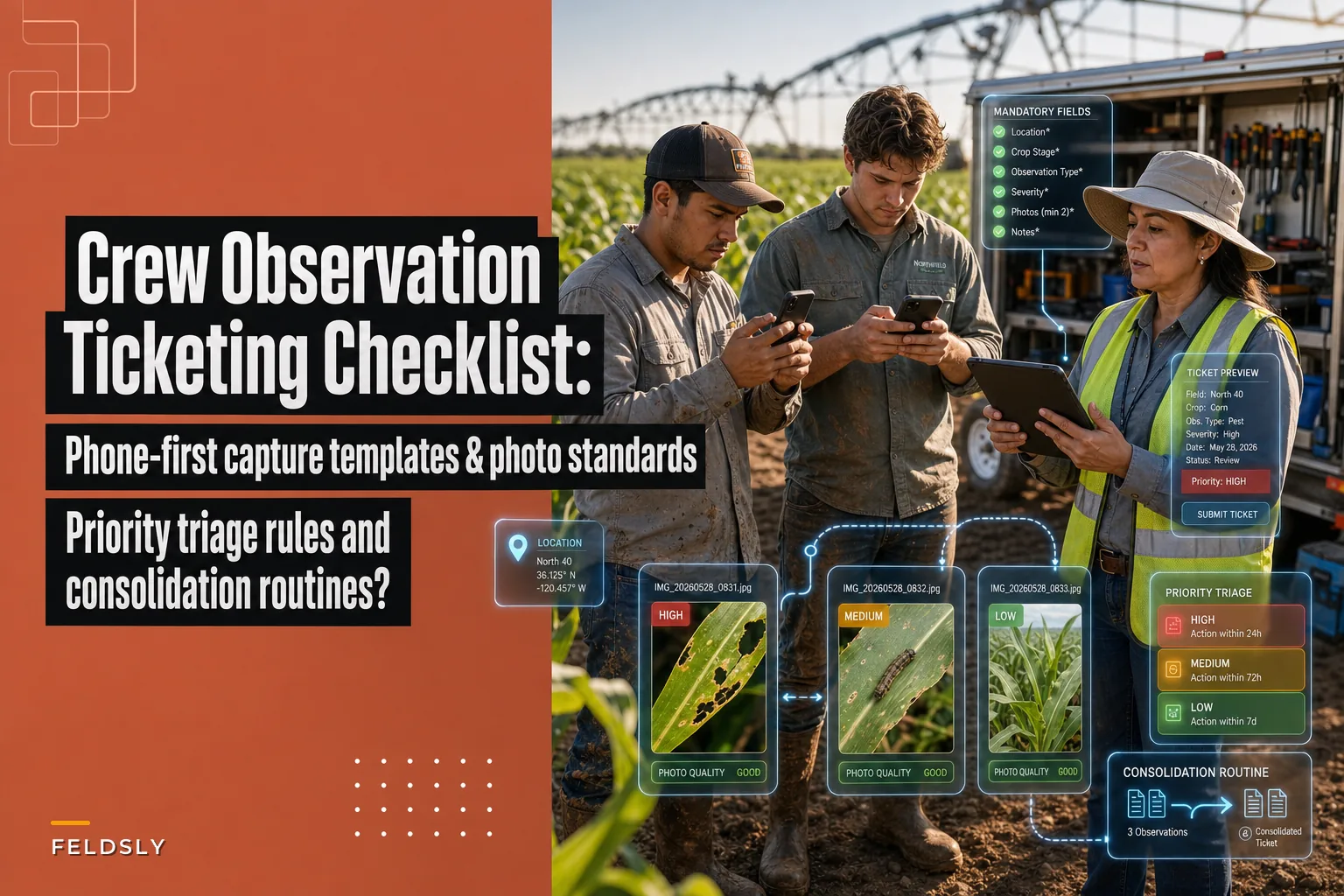

Most farms don't have an observation problem. Crews see stuff all day — a washout forming near the north culvert, a planter row that's skipping, cutworm damage in a low spot, a leaking hydraulic line someone "meant to mention." The problem is what happens to those observations after they leave the crew member's mouth or head.
Nine times out of ten, they die in one of three places: a text message that scrolls off the screen, a verbal comment at the tailgate that nobody wrote down, or a note scrawled on a diesel receipt that ends up in a truck cupholder. By the time the information actually matters, it's either gone or shows up three days too late to do anything about it cheaply.
This is a checklist for fixing that specific gap — how crews capture observations on their phones, what those captures need to include, how you rank them, and how you roll them up daily so nothing important sits unseen.
The real failure isn't the missed observation — it's the missing structure around it
Worth understanding before you build anything.
A crew member notices a problem. In their head it's obvious — they can see it, they know the field, they know the equipment. So when they report it, they compress it: "There's a wet spot messing up the planter in the back forty." To them that's a complete sentence. To whoever reads it later, it's useless. Which planter? Which pass? How wet? Standing water or just soft? Did they keep planting through it or stop?
The observation was fine. The capture was garbage. And you can't triage what you can't understand.
This usually happens because there's no shared format. Every person reports differently. One guy sends a photo with no text. Another sends three paragraphs and no photo. A third calls the manager, who's on a tractor and forgets by lunch. The information exists — it just never becomes a ticket, meaning a thing with a location, a category, a severity, and an owner.
That's the whole game. A crew observation ticketing checklist forces every field note through the same funnel so it comes out as something actionable instead of noise.
Phone‑first capture: the fields that must be mandatory
Your crew has a phone in their pocket. That's your capture device. Not a clipboard, not a whiteboard back at the shop, not their memory. The phone.
Take control of your farm’s productivity.
Feldsly helps you plan, track, and optimize every farming operation with precision.
- Centralized crop scheduling
- Resource & labor management
- Real-time weather alerts
No credit card required
But a phone form only works if it's fast and if it refuses to submit without the fields that make a ticket usable. Make everything optional and people skip everything. A form with 4–6 mandatory fields gets filled out consistently. A form with 12 fields gets abandoned or filled with junk.
-
Location — field name plus a rough pin or landmark ("Henderson 80, southeast corner near the grain leg"). GPS pin if the form supports it.
-
Category — a short dropdown, not free text. Equipment, agronomy/crop, safety, infrastructure, input/supply, other. Dropdowns are non-negotiable because free text can't be sorted or counted.
-
What you saw — one or two sentences. Plain language.
-
Photo — at least one (standards below).
-
Severity guess — the crew's gut read on a simple 1–3 scale. They're not always right, but their first instinct catches urgent stuff fast.
-
Still happening? — yes/no. An active leak right now is a different animal than a stain from yesterday.
Notice what's not mandatory: cause, recommended fix, cost estimate. Crews shouldn't diagnose. That's triage's job. Asking a seasonal worker to guess the root cause of a planter skip just slows them down and produces bad data. Capture the symptom, let someone with context do the thinking.
One thing worth avoiding: don't make the name field mandatory if your form is tied to a logged-in phone. If people have to type their name every time, they stop. Pull it automatically.
Photo standards, because "a photo" isn't enough
A blurry close-up of a leaf tells you nothing. A photo of a whole field from 200 feet tells you nothing either. The reason photo tickets fail isn't lack of photos — it's photos that can't be acted on.
Three shots solve almost everything, and training crews to think in this sequence makes a real difference:
| Shot | Purpose | Common mistake |
|---|---|---|
| Wide / context | Shows where the problem sits in the field or on the machine | Skipped entirely, so nobody can find it later |
| Mid / the problem | Shows the actual issue — the skip, the damage, the leak | Taken too far away to read |
| Close / detail | Shows severity — insect, lesion, crack, wear | Blurry because phone camera didn't focus |
For agronomy observations, one rule saves a surprising amount of back-and-forth: put something in the frame for scale. A boot, a pocket knife, a hand. "Small lesions" means five different things to five people. A leaf next to a thumbnail is unambiguous.
put something in the frame for scale.
For equipment, different rule: get the part number or serial plate in a shot if it's visible. When a hydraulic fitting is failing, a photo of the fitting plus the ID plate turns a two-hour parts hunt into a five-minute order.
Timestamp everything automatically. Manual timestamps get faked or forgotten. The phone knows when the photo was taken — use that.
Priority triage rules: separating "now" from "noise"
This is where most systems fall apart. Everything gets marked urgent, so nothing is. Or nothing gets marked, and the truly urgent stuff sits alongside routine observations with no way to tell them apart.
You need triage rules that don't depend on whoever's reviewing tickets that day being in a good mood. The cleanest approach is a two-question test applied to every ticket:
-
Is it getting worse by the hour, or is it stable?
-
Does it threaten the crop, a person, or a critical machine in the current window?
Cross those two questions and you get a simple decision grid. Getting worse fast and threatening something critical means P1 — act today, reassign if needed. Getting worse fast but not immediately threatening anything means P2 — schedule this week. Stable but still a real problem also lands at P2. Stable and low stakes is P3 — log it and batch it for the weekly review.
| Condition | Threatens crop/person/critical machine | Doesn't |
|---|---|---|
| Getting worse fast | P1 — act today, reassign if needed | P2 — schedule this week |
| Stable | P2 — schedule this week | P3 — log and batch |
A P1 is an active hydraulic leak on the only working planter during planting, a person-safety hazard, or an irrigation break during a heat stretch. Everything drops for it.
A P2 is real but not on fire — cutworm pressure that needs scouting confirmation, a fence gap, a section skipping but the machine's still running. It gets a name and a day.
A P3 is the stuff that quietly matters over a season but never in a single afternoon — a low spot to flag for drainage planning, minor wear, a gate that sticks.
The thing most farms miss: timing changes severity. The exact same cutworm observation is a P3 in June and a P1 during a tight replant window. Triage can't be static. Whoever reviews tickets needs the calendar in their head. That's also why pairing observation data with field performance history sharpens the call — if a ticket lands in a field you already flagged as underperforming, it deserves a harder look than the same ticket would in a clean field. If you've built out yield benchmarks and simple anomaly alerts to prioritize scouting, a routine-looking note in a problem field stops being routine.
The daily consolidation routine — the part everyone skips
Capture and triage mean nothing if tickets pile up unreviewed. The single biggest reason observation systems fail after two weeks is that nobody owns the daily roll-up. Crews keep submitting, tickets keep landing, and the pile grows until people stop trusting that anything happens when they report — so they stop reporting.
The fix is a short, non-negotiable consolidation routine. Fifteen minutes, same time every day, one owner.
A workable end-of-day process:
-
Pull everything submitted since the last review. All categories, all fields.
-
Kill duplicates. Three people reporting the same washout is one ticket, not three. Merge them.
-
Triage each one using the grid above. Assign P1/P2/P3.
-
Assign an owner and a date to every P1 and P2. A ticket with no owner is a wish, not a task.
-
Batch the P3s into a weekly review so they don't clog the daily flow but don't disappear either.
-
Close the loop. Reply to the crew member on P1s and P2s — even one word. "Got it, ordering part." People report more when they see reports go somewhere.
Here's a simple visual of the consolidation flow.
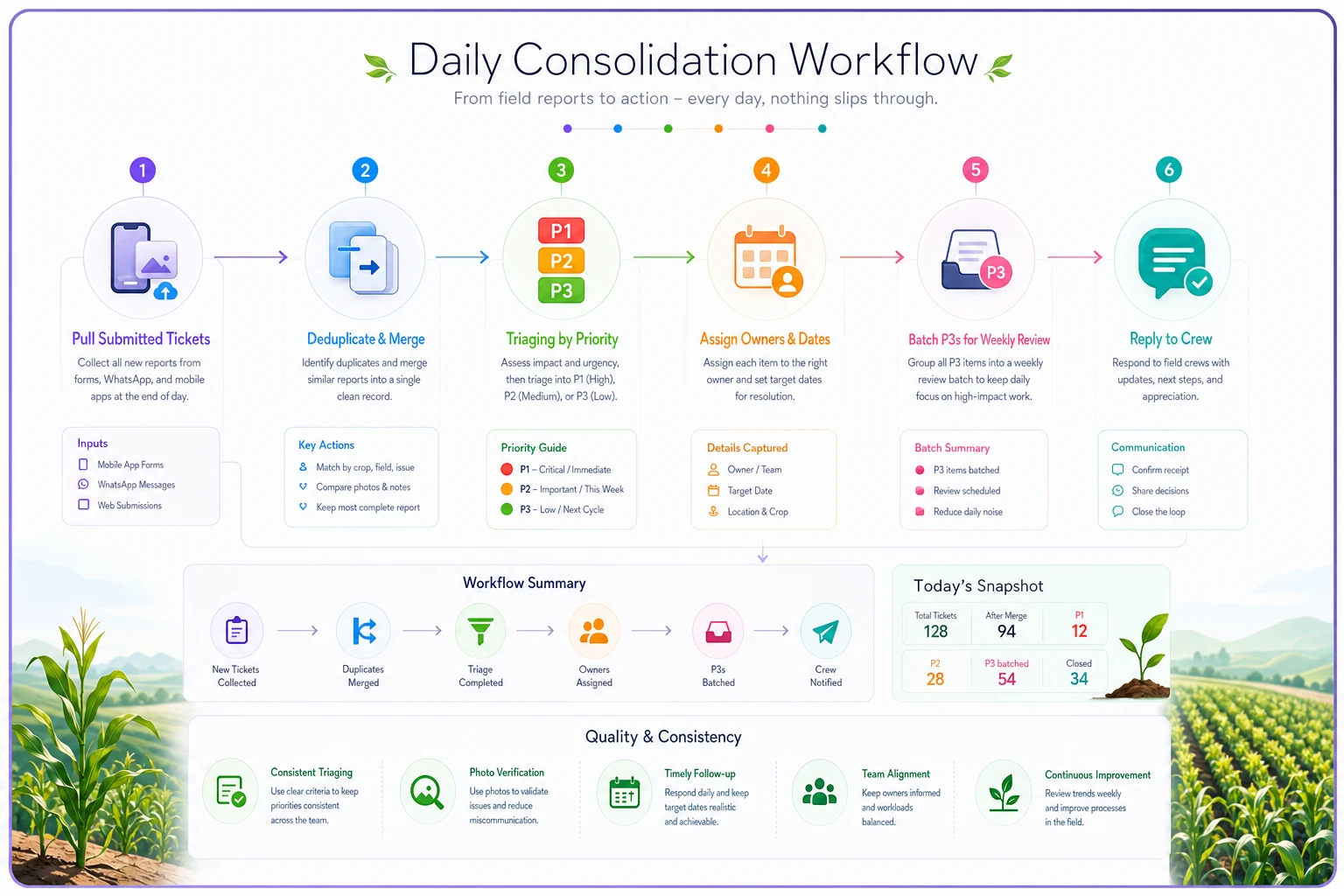
That last step is the one operators consistently underestimate. The feedback loop is what keeps the whole system alive. A crew that watches its observations turn into fixed problems becomes your best early-warning network. A crew that shouts into a void goes quiet within a month.
If your operation runs a lot of seasonal or migrant crew, this routine also stacks well with onboarding. Teaching the capture format on day one — the same way you'd build out compliance‑first onboarding workflows for seasonal and migrant crews — means the ticketing habit starts before anyone's actually out in the field.
A real scenario: what changed on a mid‑size row‑crop operation
A roughly 2,400-acre corn and soybean operation running two planters and a small crew during spring. Before any structure, field problems reached the manager by text, phone call, or tailgate chat. During one planting stretch, a recurring row-unit skip on planter two got mentioned "a few times" over about a week before anyone connected the reports. By the time it got fixed, somewhere around 15–20 acres had gone in thin. Not catastrophic, but not free either — a few thousand dollars of lost stand plus replant labor.
The fix wasn't complicated. They built a six-field phone form, drilled the three-photo habit, and made one person responsible for a 6 p.m. roll-up. Within the first couple weeks, the daily consolidation caught two separate equipment tickets that would've otherwise stayed scattered across different people's texts, and merged them into one clear repair before planting day.
By the end of the season the manager described it less as a dramatic ROI story and more as "we stopped getting surprised." Tickets that used to surface three days late were surfacing that evening. That's the real payoff — fewer expensive surprises, not a magic revenue jump.
When this is worth building — and when it isn't
When it makes sense: You've got more than one crew, more than a couple hundred acres, multiple pieces of equipment running at once, or any operation where the person seeing the problem isn't the person who fixes it. The moment there's distance — physical or organizational — between observation and action, structured tickets pay for themselves.
When it's overkill: A tight owner-operator setup where the same two people see everything and talk constantly probably doesn't need formal ticketing. If you can walk the whole operation in an hour and already know every problem, a form is just friction.
Who should not do this: Anyone who won't commit to the daily consolidation. The capture form is the easy part. If nobody owns the roll-up and the loop-closing, don't start — a half-built system that ignores crew reports is worse than no system, because it teaches your best observers that reporting is pointless.
Where software fits — and where it doesn't
You can run this on free tools. A shared form, a spreadsheet, a group chat for P1s. Plenty of operations do exactly that, and it beats chaos.
Where structured operational software earns its keep is in the parts humans do badly at scale: automatically pulling location and timestamp, forcing mandatory fields so incomplete tickets can't slip through, flagging duplicate reports from the same area, and surfacing the daily roll-up without someone manually assembling it. When you're merging reports from six people across four fields, having tickets sort and cluster themselves — instead of someone eyeballing a chat log at 6 p.m. — is the difference between a routine that survives the season and one that quietly dies in week three.
But the tooling is secondary. A dead-simple system people actually use beats a sophisticated one they ignore. Start with the discipline — mandatory fields, photo standards, triage rules, daily consolidation — and let the tools reduce the manual grind once the habit is real.
The one thing to get right
If you take nothing else from this:
the capture format and the daily loop matter more than the tool. Force every observation through the same funnel, make photos usable, triage against the calendar, and close the loop with your crew every single day. Do that consistently, and the scattered field notes that used to vanish start showing up as tickets you can actually act on — which is the entire point.
the capture format and the daily loop matter more than the tool. Force every observation through the same funnel, make photos usable, triage against the calendar, and close the loop with your crew every single day. Do that consistently, and the scattered field notes that used to vanish start showing up as tickets you can actually act on — which is the entire point.
Ready to revolutionize your farm management?
Join 500+ farms using Feldsly to boost yields, reduce waste, and streamline daily farm workflows.