


Most farm software purchases go sideways for a boring reason: the demo looks great, everyone nods, and nobody wrote down what "great" actually meant before the sales rep drove the mouse. Six months later you're fighting a prorated contract because the mobile app drops planting records when there's no signal in the back 80, and the "full API" turns out to be a CSV export you have to email support for.
This is a working farm management system RFP checklist built for a corn‑soy operation around 3,000 acres — big enough that spreadsheets have become a liability, small enough that you're not buying a six‑figure enterprise ag platform with a dedicated implementation team. The goal isn't to tell you which vendor to pick. It's to give you the language, the test scripts, and the contract clauses so you control the evaluation instead of the sales cycle controlling you.
Everything below is meant to be copied, edited, and dropped into your own RFP document. Strip whatever doesn't apply.
First, get the taxonomy straight (or you'll compare apples to tractors)
Half the confusion in FMIS buying comes from vendors calling very different products by the same name. Before you send anything out, decide which category you're actually shopping for. These overlap, but the center of gravity is different.
| Category | What it's actually built around | Where it's weak | Fit for 3,000‑ac corn/soy |
|---|---|---|---|
| Records/Compliance FMIS | Field activity logs, input tracking, spray/chemical records, basic reporting | Thin on agronomy, weak mapping, limited machine integration | Good baseline, often too shallow alone |
| Precision/Agronomy platform | Yield maps, VRA prescriptions, soil zones, imagery | Weak on labor, finance, work orders | Strong if you run VRA and multiple hybrids |
| Farm ERP / financial‑first | Field‑level P&L, cost allocation, inventory, payroll ties | Clunky in‑field UX, light on telemetry | Strong if cost‑per‑acre is your pain |
| Machine/OEM telematics | Equipment data, guidance, as‑applied from one color of iron | Locked to brand, poor cross‑OEM, not a records system | Useful feed, bad as the system of record |
| All‑in‑one FMS | Tries to cover records + agronomy + some finance + mobile | Jack of all trades; depth varies wildly by module | Common landing spot — vet each module separately |
The mistake that keeps coming up: a farm buys an "all‑in‑one" expecting ERP‑grade cost accounting and precision‑grade prescriptions, then discovers both modules are 60% solutions bolted onto a records core. Decide which one capability you refuse to compromise on. That's your anchor category. Everything else is negotiable.
One practical note — if your equipment is mixed color (say Deere planter, Case sprayer, a Kinze on loan), treat cross‑OEM data ingestion as a hard requirement, not a feature. Single‑brand telematics quietly fails you here because it'll show 70% of your as‑applied acres and silently skip the rest.
The capability lists: must‑have vs. nice‑to‑have
Rank these before you watch a single demo. If you rank them during the demo, you'll rank them by whatever the vendor showed last.
Take control of your farm’s productivity.
Feldsly helps you plan, track, and optimize every farming operation with precision.
- Centralized crop scheduling
- Resource & labor management
- Real-time weather alerts
No credit card required
Must‑have (no‑go items if missing)
-
Field boundary management that imports your existing shapefiles without manual redraw, and handles split/merged fields across seasons without orphaning historical data
-
Offline‑first mobile capture — records entered with zero bars must queue and sync later, with visible sync status
-
As‑applied and as‑planted ingestion from your actual equipment list (name the brands/models in the RFP)
-
Chemical/restricted‑use records with re‑entry interval and buffer tracking, exportable in a format your state accepts
-
Per‑field, per‑operation cost capture at least at the input + pass level
-
User roles that separate owner, manager, agronomist, and seasonal crew permissions
-
Bulk data export in open formats (shapefile/GeoJSON, CSV) that you can trigger anytime without a support ticket
-
Documented, tested API — not "integrations available," an actual endpoint list
Nice‑to‑have (score these, don't reject on them)
-
Satellite/drone imagery layers and in‑app NDVI
-
Built‑in VRA prescription builder
-
Weather station / forecast integration
-
Grain inventory and contract tracking
-
Equipment maintenance scheduling
-
Scouting with photo tagging and GPS pins
-
Benchmarking against anonymized regional data
Put a weight on each nice‑to‑have (1–5). When two finalists tie on must‑haves — and they usually do — the weighted nice‑to‑have score breaks the tie honestly instead of emotionally.
Worth flagging: farms routinely overweight imagery (it's visually impressive in demos) and underweight offline reliability (it's invisible until planting season exposes it). Pretty maps don't matter if the crew can't log an operation in a dead zone.
Scripted demo scenarios (make them drive, not present)
Never let a vendor run their own scripted demo. Hand them your scripts and make them perform the tasks live, in their software, while you watch the clicks. If they "circle back to that offline question," note it — that's usually where the product is weakest.
Script 1 — Rainy‑delay replan. "A 240‑acre field was scheduled for planting Tuesday. Rain pushed it. Move it to Friday, reassign the planter and operator, and show me how the updated plan reaches the crew's phone." (Watching for: how replanning cascades, whether crew gets notified, whether equipment conflicts are flagged.)
Script 2 — Mid‑pass hybrid switch. "We're planting field 14 with Hybrid A, run out, and finish the last 30 acres with Hybrid B. Record this so the yield map later attributes correctly." (Watching for: partial‑field attribution, whether it forces one hybrid per field.)
Script 3 — Spray record under audit. "Pull every restricted‑use application on field 7 this season, with product, rate, applicator, wind, and REI, formatted for a compliance request." (Watching for: time to produce, format, whether anything requires manual re‑entry.)
Script 4 — Cost rollup. "Show me cost per acre for soybeans on the north farm, broken into seed, chem, fuel, and labor." (Watching for: whether labor and fuel actually flow in, or if those fields are blank placeholders.)
Script 5 — The ugly import. Send them a real export from your current system a week before the demo. "Import this and show me field boundaries and last season's yield." (Watching for: how much broke, how much needed hand‑cleaning.)
That last one is the most predictive test on the list. Migration pain is where FMIS projects die, and a vendor who dodges a real file is telling you something.
API, telemetry, and integration expectations (write these as requirements)
"Has an API" is marketing. Put specifics in the RFP and require written answers:
-
Authentication — OAuth2 or token‑based? Who issues and rotates credentials?
-
Endpoint coverage — can you read and write field boundaries, operations, and as‑applied data? Read‑only APIs are a trap.
-
Rate limits — numbers, in writing.
-
Telemetry ingestion — which OEM connections are native (John Deere Operations Center, Climate FieldView, CNH, Trimble, Ag Leader)? Which are "on the roadmap"?
-
Data latency — when a sprayer finishes a pass, how long until it's visible? Same‑day? Next sync? Manual upload only?
-
Webhooks or polling — can external systems get notified of new records, or must they poll?
-
Export completeness — does the API return everything the UI shows, or a subset?
Make them answer in a table in their proposal. The gaps between "native," "via partner," and "roadmap" tell you exactly where your real integration work will land. A frequent surprise: telematics that imports guidance lines beautifully but can't push a VRA prescription back out to the display — which means your crew is still carrying USB sticks to the cab.
Mobile UX test scripts (the part crews actually live in)
Office staff tolerate bad software. Crews just stop using it, and then your system of record quietly becomes somebody's notes app. Test the phone experience harder than the desktop.
Field tests to run on an actual phone, with an actual crew member:
-
Airplane‑mode test. Turn off cellular, log a full planting operation, drive out of range, come back, confirm it synced with nothing lost.
-
Glove test. Can someone tap through operation logging wearing work gloves without mis‑taps?
-
Sunlight test. Walk outside at midday. Is the screen readable, or is it a mirror?
-
One‑thumb test. Can a key log be completed one‑handed while standing at the planter?
-
Time‑to‑log. Stopwatch a routine operation entry. Over 90 seconds and crews will start cutting corners.
-
Battery drain. Run GPS logging for two hours and check how much battery it consumed.
Have an actual operator — not the owner, not the salesperson — do these. The person who'll use it hundreds of times a season should get a vote before you sign anything.
The phased pilot: don't buy the whole thing on faith
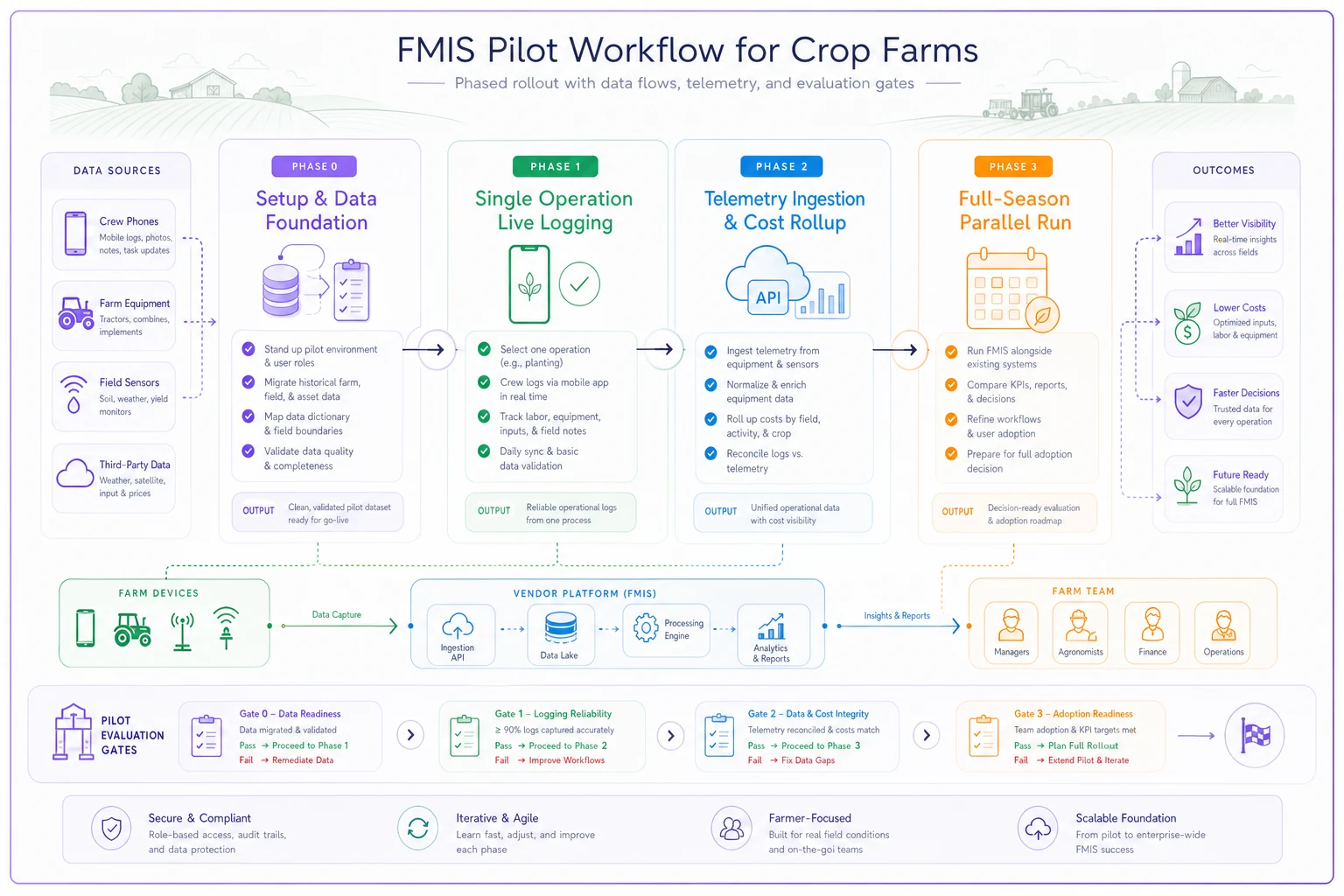
Never roll an FMIS farm‑wide on a cold contract. Structure a paid pilot with real exit gates. Here's a phased plan you can adapt.
-
Phase 0 — Setup (2–3 weeks). Migrate boundaries and one prior season for a 300–400‑acre subset. Gate: boundaries and historical yield render correctly with under ~5% manual correction.
-
Phase 1 — Single operation (one planting or spray window). Crew logs live on the pilot fields. Gate: ≥90% of operations captured in‑app, sync failures under a handful, crew time‑to‑log acceptable.
-
Phase 2 — Telemetry + cost (post‑operation). As‑applied flows in automatically; cost‑per‑acre populates. Gate: machine data matches hand records within tolerance, cost fields actually fill.
-
Phase 3 — Full‑season parallel run. Run the pilot acres alongside your old system for a full season. Gate: you'd trust the pilot data in a buyer or lender conversation.
Sketch of the pilot workflow and gates to evaluate vendor performance.
Pilot KPIs worth tracking:
-
Operations captured in‑app vs. total (target north of 90%)
-
Sync failure rate per 100 logs
-
Median time‑to‑log a routine operation
-
% of as‑applied acres ingested without manual upload
-
Hours of staff time spent on data cleanup per week
-
Crew adoption — how many actually use it unprompted by week four
Set a real walk‑away gate before Phase 0: "If after the full‑season parallel run we're still hand‑correcting more than X hours a week, we don't convert." Write that number down while you're still unemotional about it.
Data migration: who owns what, in writing
Migration is where timelines blow up. Split the responsibilities explicitly in the RFP — vague ownership here guarantees finger‑pointing come March.
-
You provide exports from the current system, a cleaned field list, boundary files, and a named point of contact.
-
Vendor provides import tooling, a documented field‑mapping, a test import on sample data, and a correction pass.
-
Jointly agreed what historical depth migrates (2–3 seasons is usually the sweet spot — older data is rarely clean enough to trust), and a sign‑off checklist confirming boundary, yield, and input records transferred correctly.
If your master data is messy going in, it'll be messy coming out. Clean field naming and boundary hygiene before migration pays for itself.
Standardize field names and remove duplicates before exporting—migration correction work is almost always more hours than you budgeted.
The same discipline that applies to labor and planning data — like when you're recalculating numbers after cost shifts such as the July 2026 minimum‑wage hikes — applies here: garbage in, audited garbage out.
Security and SLA language you should insist on
You don't need enterprise paranoia, but a 3,000‑acre operation's data is a real business asset.
-
Uptime SLA with a stated target (99.5%+) and what happens if they miss it — service credits, not apologies.
-
Support response times by severity, with planting/harvest "peak season" tiers. A four‑hour response is useless if it's four business hours and your planter is down on a Saturday.
-
Data encryption at rest and in transit, stated plainly.
-
Breach notification window — how fast they tell you if your data's exposed.
-
Subprocessor list — who else touches your data (cloud host, imagery provider, analytics).
-
Backup and recovery — how often they back up and how fast they can restore.
Get these in the contract, not the handshake:
Export and data‑ownership clauses (the ones that save you at renewal)
This is the section most farms skip and most regret. Your leverage is highest before you sign. Require these clauses where you can:
-
"The customer owns all data entered into or generated within the platform, including derived layers such as yield maps and prescriptions." Derived data is where vendors get slippery.
-
Self‑service bulk export in open formats, available anytime during the subscription without fees or a support ticket.
-
Post‑termination export window — at least 60–90 days after the contract ends to pull everything, free.
-
Deletion on request — they purge your data within a stated window after you leave, with confirmation.
-
No training/resale without consent — your data isn't fed into their benchmarking products or sold to input suppliers unless you opt in.
-
Format commitment — exports stay in documented, non‑proprietary formats so you can actually reopen them elsewhere.
The ownership‑of‑derived‑data point deserves emphasis. A farm can agree it owns its raw records, then discover the yield maps and zone prescriptions — the stuff that took three seasons to build — are considered "platform output" the vendor controls. Close that gap in writing.
When this full process makes sense — and when it's overkill
Run the full RFP when: you're consolidating multiple spreadsheets and point tools, you run mixed equipment, cost‑per‑acre reporting matters to a lender or landlord, or you're committing for 3+ years. At 3,000 acres with the usual data sprawl, you're squarely in this zone.
Scale it down when: you only need clean compliance records and nothing else — skip the agronomy and ERP scripts entirely and just stress‑test records and export.
Who should NOT do this: anyone treating software as a cure for undefined processes. If your field naming is chaos and nobody agrees who logs what, fix the workflow first. An FMIS will faithfully digitize your confusion and hand it back with a nicer dashboard.
A realistic scenario of how this plays out
A corn‑soy operation around 3,000 acres, three full‑time operators plus seasonal help, mixed Deere and Case equipment. Field records were living in a shared spreadsheet and as‑applied data was trapped in two separate OEM portals. Compliance pulls took an afternoon of copy‑paste; cost‑per‑acre was a guess backed into at year‑end.
They scoped an RFP like the one above and put three vendors through the scripted demos. Two looked polished until the ugly‑import test — one choked on cross‑OEM data, the other couldn't handle partial‑field hybrid attribution. The third was less flashy but passed the migration test and the offline mobile test clean.
They ran a paid pilot on roughly 400 acres for a full season. By the parallel‑run gate, in‑app operation capture was sitting in the low 90s percent, as‑applied ingestion covered both equipment colors, and a compliance pull that used to eat an afternoon took a few minutes. Data cleanup dropped from several hours a week to under one. Nothing dramatic — just a defensible system of record and a renewal contract where they, not the vendor, hold the export keys.
Bringing it together
A good FMIS selection isn't won in the demo room. It's won in the document you write before anyone pitches you — the one where you've already decided your anchor category, ranked your must‑haves, scripted the tests that expose weak products, and locked down the data‑ownership language while you still have leverage.
The vendors will push you toward their strengths. Your checklist is what keeps the evaluation honest.
Copy the scripts, edit the clauses, and make every finalist earn it on your acres with your data. The farm that controls the terms of the evaluation almost always ends up with software it still trusts three seasons later — and, just as importantly, data it can walk away with if it doesn't.
Copy the scripts, edit the clauses, and make every finalist earn it on your acres with your data. The farm that controls the terms of the evaluation almost always ends up with software it still trusts three seasons later — and, just as importantly, data it can walk away with if it doesn't.
Ready to revolutionize your farm management?
Join 500+ farms using Feldsly to boost yields, reduce waste, and streamline daily farm workflows.