


Most rollout failures on farms don't come from bad software or bad ideas. They come from timing. A new scouting app, a moisture-triggered irrigation rule, a revised refill routing system — any of these can be perfectly sound and still blow up because someone decided to flip it on three days before corn planting hit full tilt.
The core problem with farm operations change management is that the calendar isn't negotiable. You can't push planting back two weeks because the pilot needs more runway. You can't ask a harvest crew to "bear with the new workflow" when every hour of daylight is burning grain moisture in the wrong direction. The windows are short, the stakes are concentrated, and a half-baked rollout during peak season doesn't just underperform — it costs yield, fuel, and crew trust that takes a full season to rebuild.
This isn't a generic "how to run a pilot" piece. It's a workbook structure tuned to the fact that your operation has two or three windows a year where mistakes are enormously expensive, and long stretches where you have room to experiment. Use the slow windows to pilot. Use the fast windows to run proven workflows. Everything below is built around that one idea.
The real reason farm rollouts fail: pilots sized for the wrong season
There's a pattern worth naming. A manager decides to test a new crew-observation ticketing flow or a VRA prescription tweak. They size the pilot by field acreage — "let's try it on the north 300 acres" — without asking what else is happening during those two weeks.
In real operations, this usually happens when the person planning the pilot isn't the person running the window. The office picks the timing; the field crew absorbs the collision. A pilot that would've gone fine in a quiet stretch lands on top of a nitrogen application push, and now you've got a crew learning a new photo-capture standard while also trying to keep the applicator moving.
Pilot-sizing recipes by season slack
| Season window | Operational slack | Pilot size recipe | What to avoid |
|---|---|---|---|
| Deep winter / planning | High | 1–2 full workflows, whole-team involvement, allow re-dos | Nothing really — this is your lab |
| Early spring prep | Medium | Single workflow, 2–3 person subset, limited scope | Anything touching equipment calibration |
| Planting window | Near zero | No new pilots. Proven workflows only | Any change to crew comms or field sequencing |
| Mid-season growth | Medium-high | Scouting/data pilots, 1–2 fields, reversible changes | Chemical application logic changes |
| Pre-harvest | Low | Observation-only pilots, no workflow changes | Grain handling or moisture workflow edits |
| Harvest window | Near zero | No pilots. Full freeze | Everything new |
| Post-harvest | High | Larger pilots, post-mortems, next-year prep | Rushing before everyone scatters |
The recipe that matters most: during planting and harvest, your pilot size is zero. If a vendor or consultant is pushing you to "just try it during the busy part so you see real conditions," that's a red flag. You see real conditions in the shoulder windows too — without betting the season on it.
A seasonal rollout calendar you can actually defend
The single most useful artifact in this whole workbook is a one-page calendar that marks which weeks are open for change and which are frozen. It sounds almost too simple, but operations that have one argue a lot less about timing.
Take control of your farm’s productivity.
Feldsly helps you plan, track, and optimize every farming operation with precision.
- Centralized crop scheduling
- Resource & labor management
- Real-time weather alerts
No credit card required
Think of the year in three zones:
-
Green zones (change-friendly) post-harvest through deep winter, plus the mid-season lull after sidedress and before harvest prep. This is where pilots live.
-
Yellow zones (change-cautious) early spring prep, pre-harvest staging. Small reversible pilots only, and only data-collection types.
-
Red zones (frozen) active planting, active harvest, and any extreme-weather response window. No new workflows. Period.
A typical corn-soy operation runs its meaningful pilots from mid-November through February, does a light validation pilot in March, then freezes everything from first-pass tillage through planting. Nothing new goes live again until the post-emergence lull. Harvest gets a hard freeze starting two weeks before the combines are expected to roll.
The discipline here is that "frozen" means frozen even when the new thing is better. If you discovered a genuinely good improvement in June, you still don't roll it during harvest. You document it, pilot it post-harvest, and it goes live next green zone. Peak windows are for execution, not experimentation.
Daily and weekly comms templates that survive a busy crew
Most rollout communication fails in one of two directions: too much (long emails nobody reads during planting) or too little (the change happens and half the crew finds out by stumbling into it).
The templates below are deliberately short because anything longer than a phone screen won't get read during a 14-hour field day.
Daily pilot pulse (send end-of-day, 4 lines max):
-
What we tested today (one field, one workflow)
-
What broke or felt slow
-
One number
tickets logged / acres covered / refills completed
-
Go / hold for tomorrow
Weekly rollout note (send before the week starts):
-
This week's pilot scope (fields + crew)
-
What's changing vs. last week
-
One thing we need the crew to watch for
-
Rollback status
are we green, or watching a trigger?
The thing most people miss: comms frequency should scale with how close you are to a red zone. During a deep-winter pilot, a weekly note is plenty. As you approach planting, even a stable workflow deserves a daily heads-up, because the cost of a misunderstanding is suddenly ten times higher.
A common mistake is routing all pilot comms through the office. The field lead running the window should be the one sending the daily pulse. They see the breakage first, and crews respond faster to the person standing next to the equipment than to an email from management.
Pilot KPIs: measure the workflow, not the vibe
The failure mode here is picking KPIs that feel impressive but don't tell you whether to continue. "Crew satisfaction" is nice to know and useless as a go/no-go signal mid-season.
Good pilot KPIs share three traits: they're countable at end-of-day, they map directly to the window's priority, and they have a clear bad threshold that triggers a conversation.
-
Workflow completion time vs. baseline — is the new scouting flow faster or slower per field than the old one?
-
Error/rework rate — how many tickets had to be redone, how many applications flagged for QA?
-
Coverage pace — acres or fields handled per crew-hour, so you catch slowdowns before they compound.
-
Data capture completeness — what fraction of events actually got logged vs. went dark?
Keep it to three or four. A pilot tracking fifteen metrics is a pilot nobody's actually watching. Tie every KPI to a baseline from the old workflow — a number with no comparison point just becomes a talking point, not a decision input.
This connects directly to the broader discipline of staged measurement and QA gates. If you want the deeper version of how pilot KPIs and rollout triggers fit into data governance, the stage-by-stage data governance playbook covers the mechanics of gating a rollout on real metrics.
SLO-based rollback triggers: decide before you're emotional
This is the part most farm rollouts skip, and it's the part that saves seasons. A rollback trigger is a pre-agreed line that says: if this metric crosses this threshold, we revert to the old workflow — no debate, no "let's give it one more day."
Set these before the pilot starts. Once you're mid-season and three days into a struggling rollout, nobody wants to admit it isn't working. Sunk-cost reasoning takes over. People say "the crew's just getting used to it" while the error rate quietly climbs. A trigger you agreed to in advance removes the ego from the decision.
-
If rework rate exceeds ~15% for two consecutive days → roll back.
-
If coverage pace drops more than ~20% below baseline → roll back.
-
If data capture completeness falls below ~80% → roll back.
-
If any safety or equipment-calibration issue appears → immediate roll back, no threshold needed.
The numbers are yours to tune. What matters is that they exist on paper, the field lead knows them, and reverting is a planned action, not a failure. A clean rollback to a workflow your crew already knows is a good outcome during a tight window — infinitely better than limping through planting on a half-working system.
The rollback has to be genuinely easy
A trigger is worthless if reverting is painful. Before any pilot goes live, confirm three things: the old workflow is still documented and runnable, nobody's thrown out the old forms or routes, and one person owns the decision to pull the cord.
Keep a printed copy of the rollback triggers with the field lead during a pilot so decisions can be made fast.
If rolling back means reconstructing how things used to work, crews will push through a broken pilot just to avoid the chaos of reverting — which is exactly the trap you're trying to avoid. Keep the old workflow intact and accessible until the new one has earned its place over a full season, not just a two-week trial.
A six-step rollout process, start to finish
Walking through this in order matters. Operations that skip steps two and four are almost always the ones that end up in a painful mid-season scramble.
Here's a simple visual of the process.
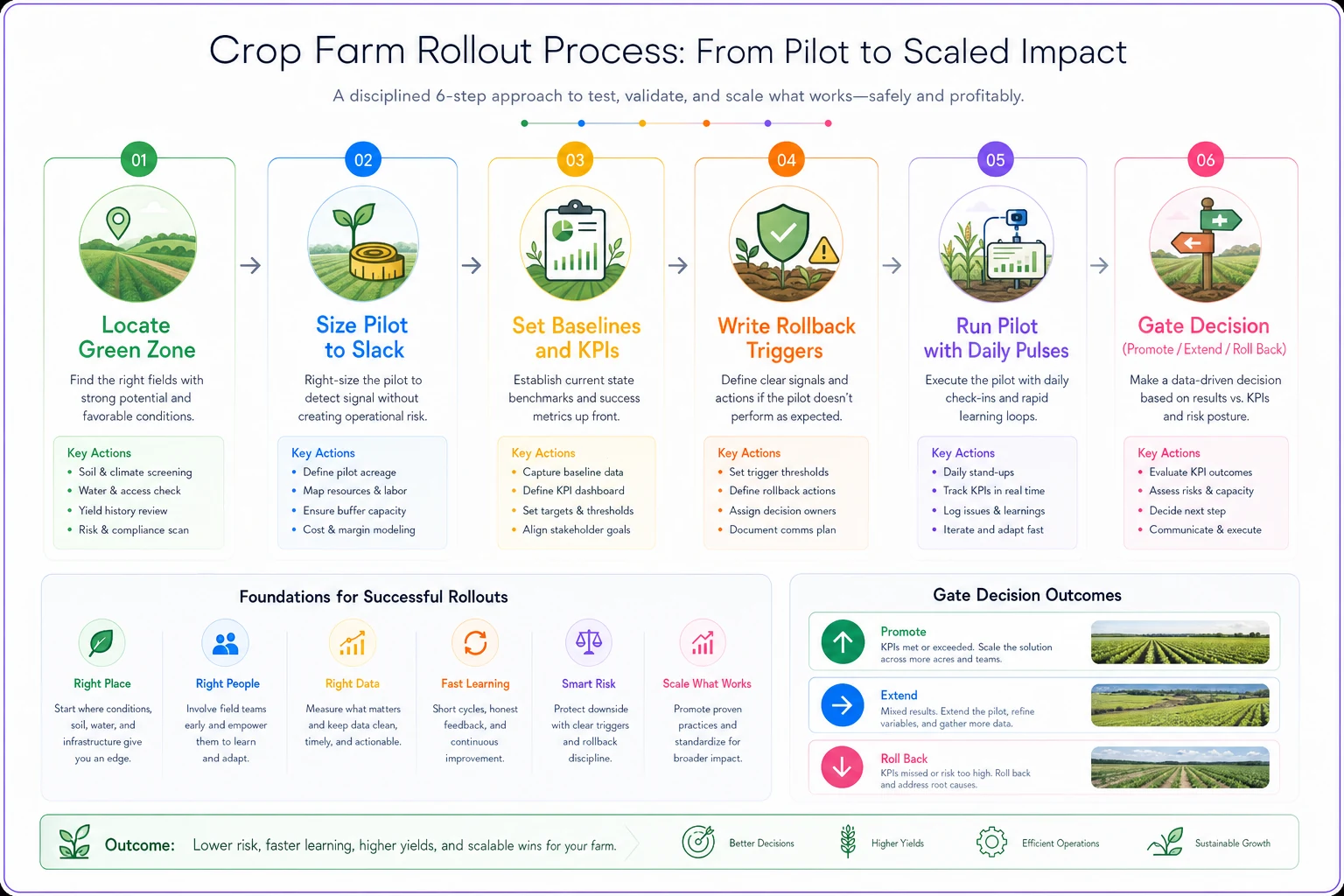
Here's what each step actually requires in practice:
-
Locate the green zone. Pick a change-friendly window from your seasonal calendar. If there's no green zone before the next red zone, the pilot waits.
-
Size the pilot to the slack, not the acreage. Match the recipe to the window.
-
Set baselines and three KPIs from the current workflow before you change anything.
-
Write the rollback triggers and confirm the old workflow is still runnable.
-
Run the pilot with daily pulses, comms frequency scaling toward any approaching red zone.
-
Decide at the gate promote to standard workflow, extend the pilot, or roll back. Then freeze it — nothing new goes live in the next red zone regardless of how good it looks.
Steps three and four feel like admin overhead until the first time a pilot goes sideways with no baseline to reference and no pre-agreed exit ramp. After that, you don't skip them.
Real scenario: a 2,400-acre corn-soy operation
A mid-size corn-soy farm wanted to roll out a new phone-first crew observation and ticketing workflow. The original plan was to launch it right as planting ramped up — the logic being "that's when we generate the most field observations, so we'll see the most value."
That timing would've been a mistake. Instead they moved the pilot into the post-emergence lull in June, scoped it to two fields and a three-person crew, and set a rollback trigger at a 20% rework rate over two days.
The first week, rework sat around 25% — crews were photographing issues inconsistently and tickets were getting reopened. Under the old "just launch it and push through" approach, that would've been a mess landing during planting. The trigger fired, they rolled back to the old paper flow for a few days, fixed the photo standard, and re-ran the pilot. Second attempt, rework dropped to roughly 8%, coverage pace held steady, and the workflow got promoted to standard.
The win wasn't the software. It was that the breakage happened in a window with slack, with a planned rollback, instead of during the two weeks where a confused crew would've genuinely cost them planting progress. Hard to put an exact number on the avoided disruption, but it was clearly the difference between a controlled test and a season-denting scramble.
When this makes sense — and when it doesn't
When this workbook is worth the effort: multi-field operations with real peak-window pressure, anywhere you've been burned by a mistimed rollout before, and any change that touches crew behavior during critical windows.
When it's overkill: a one-person operation testing a tool on their own time in winter doesn't need formal rollback SLOs. If the only person affected is you, and the window is wide open, just try the thing.
Who should NOT run a mid-season pilot at all: if your operation is already stretched thin on crew, if you're short-handed going into planting or harvest, or if the last rollout left crew trust shaky — freeze everything, run proven workflows, and save your pilots for post-harvest when people have bandwidth to learn.
The one-page version
Boiled down, the whole workbook fits on a single page a field lead can pin up:
-
Calendar green / yellow / red zones marked for the year.
-
Pilot size matched to the window's slack, zero during red zones.
-
KPIs three metrics, each with a baseline from the old workflow.
-
Rollback triggers written thresholds, agreed before launch, with the old workflow kept runnable.
-
Comms daily pulse from the field lead, frequency rising as you near a red zone.
The farms that handle change well aren't the ones with the newest tools. They're the ones that treat their calendar as the constraint it actually is — piloting hard in the quiet windows, freezing cold during the expensive ones, and never asking a planting or harvest crew to learn something new while the clock is burning yield. Get the timing right and most of the rest takes care of itself.
The farms that handle change well aren't the ones with the newest tools. They're the ones that treat their calendar as the constraint it actually is — piloting hard in the quiet windows, freezing cold during the expensive ones, and never asking a planting or harvest crew to learn something new while the clock is burning yield. Get the timing right and most of the rest takes care of itself.
Ready to revolutionize your farm management?
Join 500+ farms using Feldsly to boost yields, reduce waste, and streamline daily farm workflows.